Curious about your current standing or what you need on your final exam?
Use our Grade Calculator to quickly find your weighted grade in both letter and percent form, and see exactly what score you need to reach your target.
Grade Calculator
| Assignment Name | Grade (%) | Weight (%) | Actions |
|---|---|---|---|
Final Grade Calculator
GPA Calculator
| Course Name | Grade | Credits | Actions |
|---|---|---|---|
High School GPA Calculator
| Course Name | Grade | Credits | Actions |
|---|---|---|---|
How To Raise Your GPA
First, tell us where you're starting:
Scenario 1: Long-Term Effort
To reach that goal, if I maintain a average GPA in all my future courses, it will take -- additional credit hours.
Scenario 2: This Semester's Requirement
I am taking credit hours this semester. To hit that goal this term, I need to earn a -- average GPA on all my courses this semester.
OVERVIEW
The Grade Calculator helps you calculate your weighted average grade across multiple assignments, tests, or projects. It supports three different calculation modes and allows you to customize the decimal precision of your results.
FEATURES
- Calculate grades using percentages, letter grades, or points
- Weighted grade calculations
- Adjustable decimal places (0-2)
- Add/remove assignments dynamically
- Real-time calculation updates
- View results as percentages and letter grades
HOW TO USE
Select Calculation Mode
- Percentage: Enter grades as percentages (0-100)
- Letter Grades: Select grades from A+ to F
- Points: Enter actual points earned
Choose Decimal Places
- Select 0, 1, or 2 decimal places for your final grade display
Enter Assignment Information
For each assignment or test:
- Assignment Name: Give it a descriptive name (optional)
- Grade: Enter the grade you received (percentage, letter, or points)
- Weight: Enter the weight percentage (e.g., 25 for 25%)
Add Or Remove Assignments
- Click “+ Add Assignment” to add more rows
- Click the “×” button to remove any assignment
View Results
The calculator automatically displays:
- Total Weight: Sum of all assignment weights (should equal 100%)
- Final Grade: Your calculated weighted average
- Letter Grade: The letter grade equivalent
EXAMPLES
Example 1: Simple Percentage Calculation
- Assignment 1: 85%, Weight: 40%
- Assignment 2: 90%, Weight: 30%
- Midterm: 88%, Weight: 30%
- Final Grade: 87.30%
Example 2: Using Letter Grades
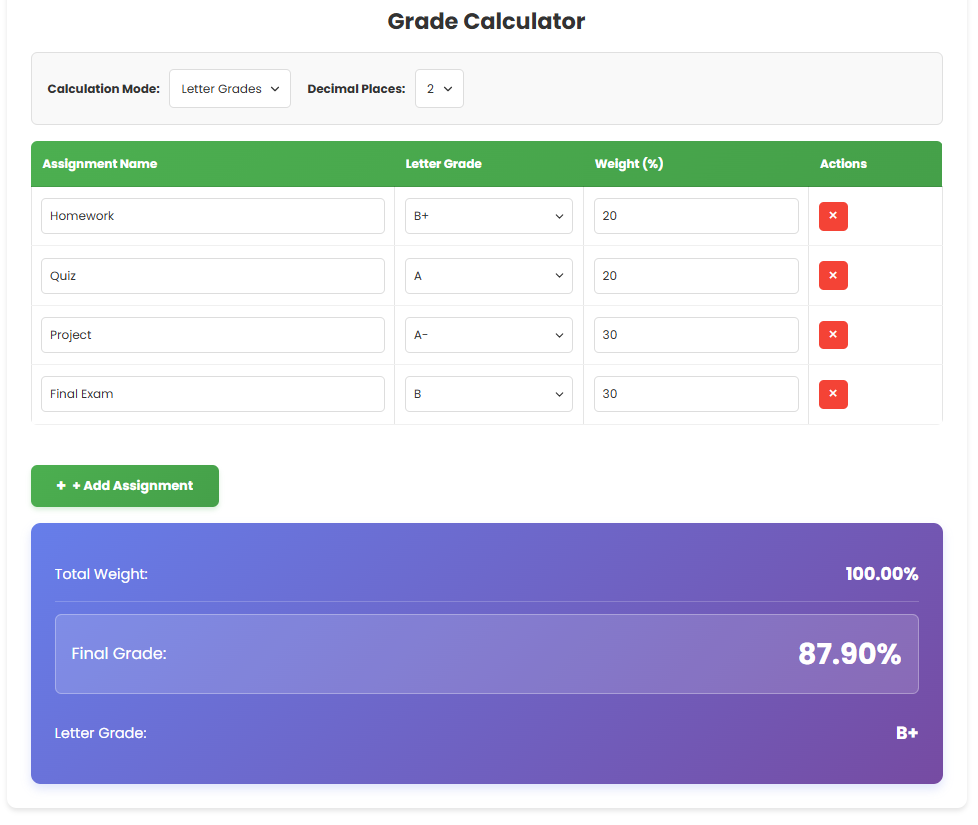
- Homework: B+ (87%), Weight: 20%
- Quiz: A (93%), Weight: 20%
- Project: A- (90%), Weight: 30%
- Final Exam: B (83%), Weight: 30%
- Final Grade: 87.90% (B+)
Example 3: Points System
- Assignment 1: 450 points, Weight: 25%
- Assignment 2: 480 points, Weight: 25%
- Midterm: 850 points, Weight: 50%
- Final Grade: 68.00%
TIPS
- Make sure your weights add up to 100% for accurate results
- The calculator updates in real-time as you type
- Use the decimal places selector to match your school’s grading system
- Letter grades are converted to standard percentage equivalents
- Points mode assumes 1000 points = 100%
GRADE CONVERSION CHART
| Letter Grade | Percentage |
|---|---|
| A+ | 97% |
| A | 93% |
| A− | 90% |
| B+ | 87% |
| B | 83% |
| B− | 80% |
| C+ | 77% |
| C | 73% |
| C− | 70% |
| D+ | 67% |
| D | 63% |
| D− | 60% |
| F | 0% |
TROUBLESHOOTING
- If your total weight doesn’t equal 100%, your final grade calculation may not be accurate
- Make sure you enter valid numbers in all fields
- If a row isn’t calculating, check that both grade and weight are entered
- Letter grades must be selected from the dropdown when in letter grade mode
Related Calculators
- 🎯Final Grade
- 🎓GPA Calculator
- 📚High School GPA
- 📈Raise Your GPA


4 Comments