Improving your GPA can feel overwhelming, especially if you’re not sure how much effort—or how many credits—it will take to see results. That’s where the GPA Raise Scenario Calculator comes in.
This easy-to-use tool helps students create a personalized strategy to raise their GPA, whether you’re aiming for a small boost or a major turnaround. It answers two key questions:
✅ How many credits do I need to raise my GPA?
✅ What GPA do I need this semester to reach my goal?
Whether you’re wondering “what GPA do I need this semester?” or “how many credits will it take to raise my cumulative GPA?”, this step-by-step guide will walk you through everything you need to know.
How To Raise Your GPA
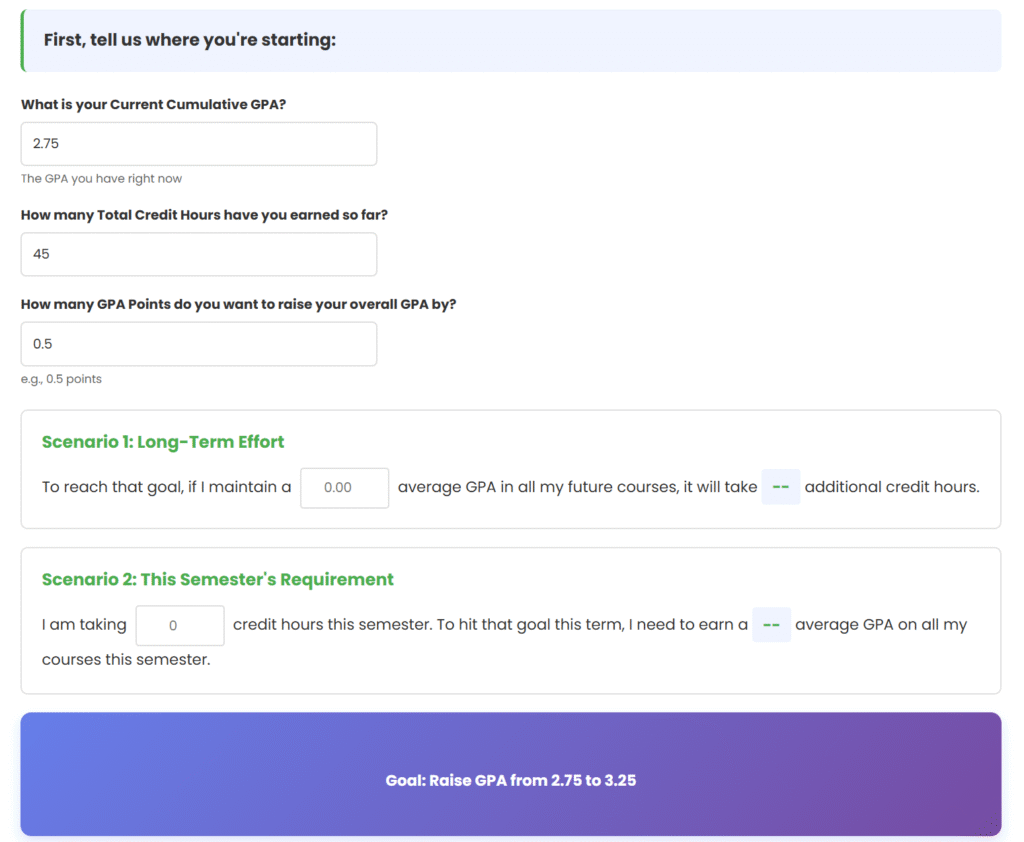
First, tell us where you're starting:
Scenario 1: Long-Term Effort
To reach that goal, if I maintain a average GPA in all my future courses, it will take -- additional credit hours.
Scenario 2: This Semester's Requirement
I am taking credit hours this semester. To hit that goal this term, I need to earn a -- average GPA on all my courses this semester.
What Is the GPA Raise Scenario Calculator?
The GPA Raise Scenario Calculator is an interactive tool designed to help students improve their cumulative GPA by running realistic “what if” scenarios. Using a GPA calculator for cumulative GPA or a GPA calculator to 4.0 scale, you can project how different grades or course loads will impact your overall GPA.
It’s perfect for students who want to understand:
- How long it will take to reach a target GPA
- What semester GPA is needed to hit a goal
- How credit hours affect GPA improvement
The tool uses your data to generate clear, actionable results—so you can plan your academic path with confidence.
Key Features
- 📊 Calculate how many credits you’ll need for long-term GPA improvement
- 🎯 Find the GPA you need this semester to meet your target
- 🔁 Real-time, “what if” scenario planning
- 💡 Two calculation modes: long-term and short-term
- 🧮 Built-in GPA calculator with weight for more accurate results
- ⚡ Easy-to-use, fast, and available online
How to Use the GPA Raise Scenario Calculator
Here’s a step-by-step guide to using the DailyLiife GPA Raise Scenario Calculator.
Step 1: Enter Your Current Situation
- Current Cumulative GPA
Enter your current overall GPA (e.g., 2.75). Tip: If you’re not sure, use your transcript or an online GPA calculator. - Total Credit Hours Earned
Enter how many credits you’ve completed so far (e.g., 45). - Target Increase
Decide how much you want to raise your GPA (e.g., by 0.5).
Step 2: Explore Scenario 1 – Long-Term Effort
Question: “How long will it take if I maintain a certain GPA?”
- Enter the GPA you plan to maintain going forward (e.g., 3.5 or 4.0).
- The calculator will show how many additional credit hours are needed to reach your target.
Example:
Current GPA: 2.8 | Credits: 30 | Target: +0.5 | Maintain GPA: 4.0
Result: You need ~30 more credit hours (about two semesters).
Step 3: Explore Scenario 2 – This Semester’s Requirement
Question: “What do I need to earn this semester?”
- Enter your current semester credits (e.g., 15).
- The calculator will show the semester GPA you need to reach your goal.
Example:
Current GPA: 2.8 | Credits: 30 | Target: +0.5 | This Semester: 15 credits
Result: You need a 3.8 semester GPA (mostly A’s).
Detailed Examples
Example 1: Moderate Improvement
- Current GPA: 3.0 | Credits: 60 | Target +0.3
- Scenario 1 (Long-Term): Maintain 4.0 → 60 more credits (≈4 semesters)
- Scenario 2 (This Semester): 15 credits → Need 3.6 GPA
Example 2: Aggressive Recovery
- Current GPA: 2.5 | Credits: 45 | Target +0.7
- Scenario 1: Maintain 3.8 → 90 more credits
- Scenario 2: 15 credits → Need 4.0 GPA
Example 3: Final Push
- Current GPA: 3.4 | Credits: 90 | Target +0.2
- Scenario 1: Maintain 4.0 → 36 more credits
- Scenario 2: 18 credits → Need 3.8 GPA
How to Interpret Your Results
Scenario 1 – Long-Term
If the result shows:
- “X additional credits needed” → Divide by 15 to estimate semesters.
- “Not achievable with this GPA” → Try raising your maintain-GPA goal.
Scenario 2 – This Semester
- GPA between 3.0–4.0: Achievable with focus and planning.
- Above 4.0: Not realistic — lower your goal or extend your timeline.
- Easily achievable: Raise your target improvement!
Strategic Tips to Raise Your GPA
- Be Realistic: Don’t plan for a 4.0 if you’ve never reached it.
- Use Both Scenarios: Compare short-term and long-term outcomes.
- Balance Grades and Credits: If you can’t earn all A’s, consider taking more credits.
- Adjust as You Go: Recalculate after each semester.
- Stay Consistent: Every semester matters.
Common Questions
Q: What if my GPA goal requires an impossible number?
A: Spread your goal across multiple semesters. Small progress adds up.
Q: Can I use this as a freshman?
A: Yes! But early grades weigh heavily—start strong.
Q: What are credits in a GPA calculator?
A: Credits represent course weight. Higher credit classes impact your GPA more.
Q: What’s the highest GPA I can get calculator?
A: On a 4.0 GPA scale, 4.0 is the maximum—representing straight A’s.
Q: How to raise GPA calculator tips?
A: Focus on courses where improvement is possible, and plan your semesters using this tool.
Formula Breakdown
Target GPA:Target GPA = Current GPA + Target Increase
Scenario 1 (Credits Needed):Credits Needed = (Current Points - Target Points) / (Maintain GPA - Target GPA)
Scenario 2 (Semester Requirement):Required GPA = (Target Points - Current Points) / Semester Credits
(Where Points = GPA × Credits)
Motivation and Real Success
Raising your GPA takes time, but it’s absolutely possible.
Every grade counts—and now you can calculate exactly how much.
💡 Real Stories:
- Sarah C.: 2.6 → 3.2 in 3 semesters
- Julie R: 2.9 → 3.5 in 4 semesters
- Rachel: 3.1 → 3.7 in 2 semesters
Use the DailyLiife GPA Raise Scenario Calculator to map your journey, stay consistent, and watch your numbers rise semester after semester.


One Comment